
CamelotforDebateOnline voting and meetings →ITENESFROpen the app
Camelot for Debate

Camelot for Debate, the platform for debate at school

Camelot for Debate lets teachers create and run structured debates in class, with roles, timing and judges' scoring, and analyse the debate with artificial intelligence.

Try it free for 40 daysWatch the videoRequest informationSelected by the Italian Ministry of Education and Merit for the Next Generation AI Summit, AI in Schools.
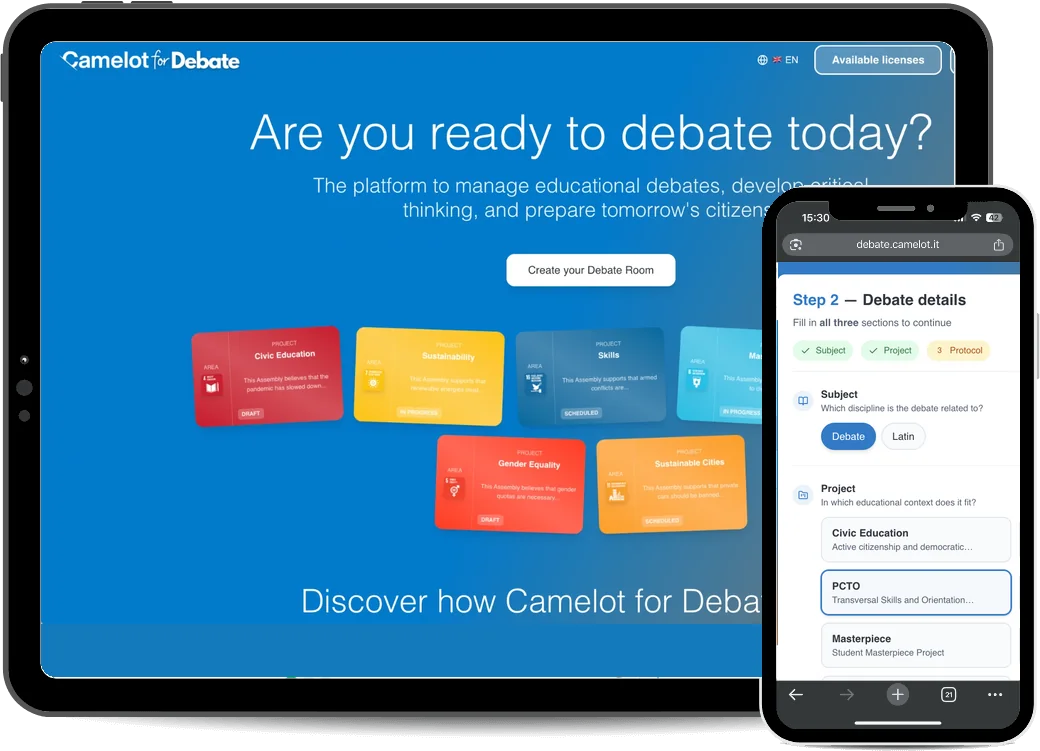
Camelot for Debate on tablet and smartphone: the app's entry page with Debate Rooms coloured by project and, on the phone, step 2 of creating a room
National Constructive Communication Award 2025Olivetti Innovative Enterprise Award 2025Selected by the Italian Ministry of Education for the Next Generation AI Summit 2025Finalists, Champions of Innovation 2024City of Pescara Award 2024Top Digital Company 2024Special mention for best pitch, Innovation Village Award 2023Enea-Enterprise Europe Network Award 2023
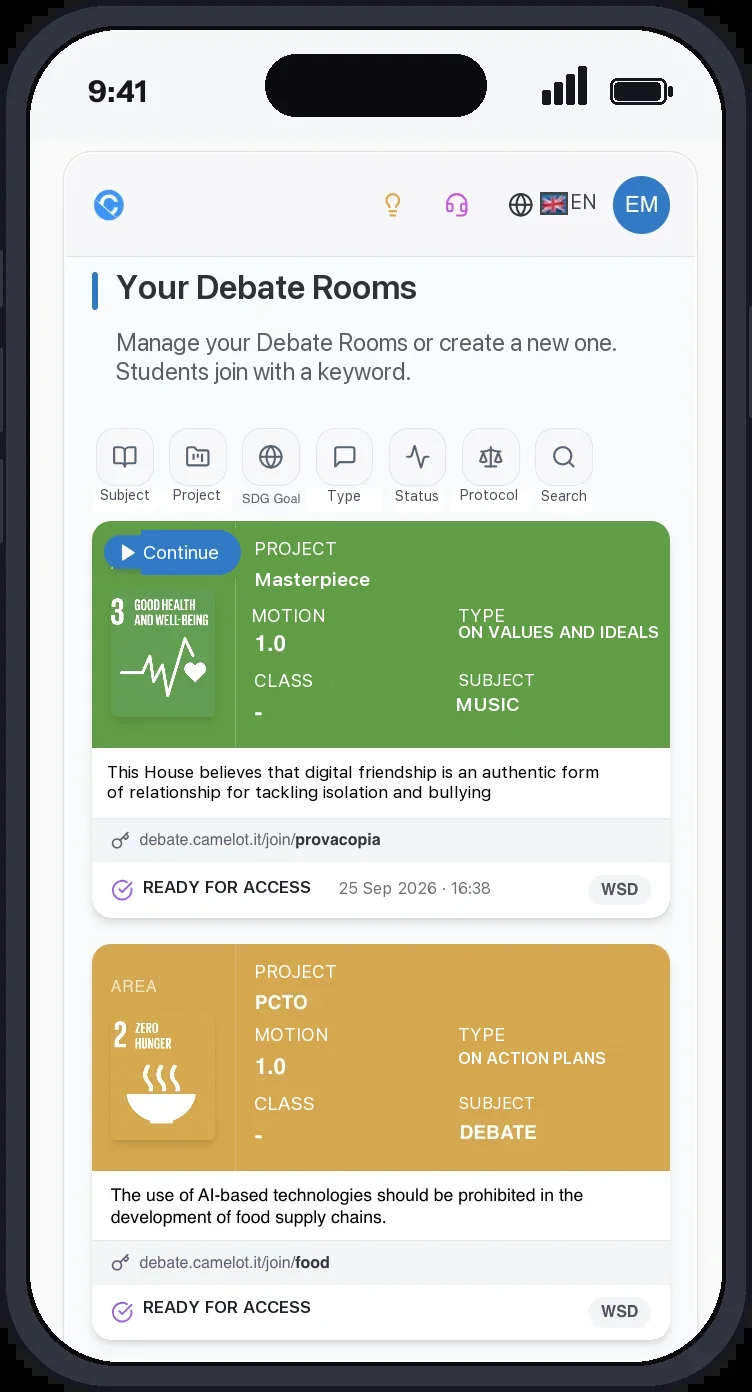
Camelot for Debate on a smartphone: the teacher's list of Debate Rooms, each with motion, format and the link with the keyword that lets students in
In brief

Debate in the classroom, with roles, timing and judges handled by the platform.

The teacher creates the Debate Room, students join with a keyword, and the report is ready when the debate ends.
A Debate Room in a few minutesThe teacher picks the motion, the format and the roles. The room is ready.Students without accounts or emailThey join with the room link and a keyword.Timing, points of information and judges handled by the platformOrder of speeches, timers, scoring sheets and PDF report.Debate analysis with artificial intelligenceArguments, rebuttals and cognitive biases. Assessment stays with the teacher.In the browser, in person, remote or hybridIn Italian and English, nothing to install.
The video in five minutes

Camelot for Debate in action

The real screens of the platform. You see how the teacher creates a Debate Room and picks the motion, how students join with the room link and choose their role, how the debate runs with timers, points of information and protected time, how judges fill in their sheet and how the report is downloaded.

Five minutes, with the real screens of the platform, from creating the room to the report.

The method

What is debate

Debate is a structured discussion in which two teams argue opposite sides of a motion, following set rules, roles and timing, in front of judges who score the speeches.

At school, debate builds critical thinking, research skills, listening, argumentation and citizenship skills. In a debate you do not necessarily defend what you think: you learn to understand a position, look for evidence and answer the other team's arguments.

To go deeper, read our guide to structured debate in schools and the article on how speeches work in World Schools Debate.

Where it fitsAn activity that fits the school's programmesCivic educationEducational guidanceWork-related learning (PCTO)Capstone projectsSelf-assessmentDevelopment of specific skillsIt works with a single class, across classes, with groups of students and teachers, up to school tournaments.
Debate and artificial intelligence

After every debate, a report that becomes the next lesson

The newest part of debate with Camelot is the analysis with artificial intelligence. From the audio of the debate, the platform reconstructs the arguments of the two teams, the rebuttals and the cognitive biases, and returns them to the teacher in a report that helps develop argumentation skills and metacognitive strategies.

Arguments and rebuttals, team by teamEach argument is placed next to the other team's response, with a label that says whether it was structured, whether the rebuttal was direct or implicit, or whether it was missing.
Cognitive biases and logical fallaciesFor each team, the bias detected, its description and the passage of the debate it refers to. Emotional reasoning, false cause, straw man, slippery slope, appeal to popularity.
How to read an argumentStructuredClaim, reasoning and support are all present.Partially structuredOne element is missing: the logical development, or examples and data.Direct rebuttalExplicitly attacks the logic or evidence of the opposing argument.Implicit rebuttalWeakens the opposing argument without naming it.Unfinished responseLink and mechanism present, but the impact is missing.Unlinked responseThe opponent replied without really rebutting.
Cognitive bias or logical fallacyCognitive biasA systematic error of reasoning of a psychological nature: an unconscious distortion in how information is perceived, remembered or interpreted. For example confirmation bias, emotional reasoning, anchoring.Logical fallacyAn error in the logical structure of the argument: flawed reasoning that weakens the validity of the claim, regardless of the speaker's intentions. For example ad hominem, false equivalence, slippery slope.
The report and the guide

From the report to the next lesson

The guide for the post-debate analysisFor every label, the report explains what the system detected, suggests a guiding question for the debriefing in class and an exercise to prepare the next debate.
Delivered by email, in two formatsThe full report in A4 to file the activity and a 16:9 slide version to project and discuss with the class. The analysis is descriptive, not evaluative: assessment stays with the teacher.
See a sample reportHow the analysis worksA real report generated on 24 September 2026 on the motion: this House believes that social networks should be banned for under-15s. PDF, 5 pages, in Italian.
The report detectsSE · Examples or data to addThe team has a claim and reasoning to support it, but no data, real case or citation as evidence.
Debriefing question«This reasoning is well built. Do you have a figure, a study or a real case that confirms it?»
Exercise for the next debateFind the evidenceThe team looks for at least two sources or examples in support and discusses which type of evidence is most effective for that motion.
The report detectsRNC · Unfinished responseThe team explained why the opposing argument does not hold, but did not say what changes in the debate.
Debriefing question«You took the argument apart but did not close. What changes in the debate now that you have shown that weakness?»
Exercise for the next debateClose the rebuttalThe team adds a final sentence starting with «This means that…» or «As a result, the opposing argument…».
By email to the teacher:Full A4 report16:9 slides for the classSummary in the body of the email
How it works

How Camelot for Debate works

Five steps, from creating the room to the report. The teacher has everything on one screen; students only see what their role needs.

01

Create the Debate Room

Choose the project, subject, class, format and a motion from the validated list, or write your own. A preview of the room updates as you fill in the form.
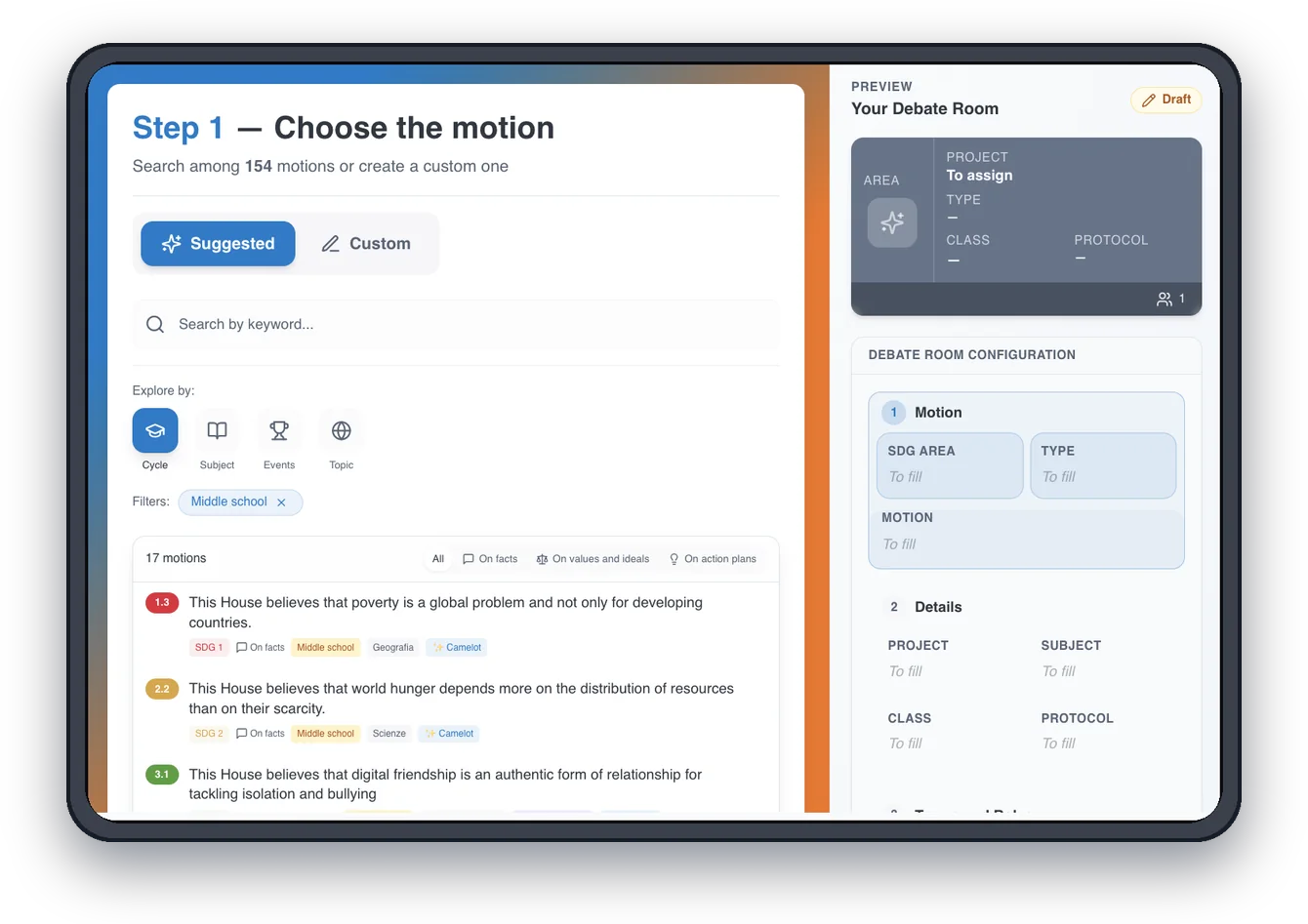
Camelot for Debate on a tablet, step 1 of creating a Debate Room: searching the suggested motions by school level, subject, events and topic, with the room preview on the right
02

Assign the roles

Students join with the room link and the keyword and pick their assigned role: speaker, judge, timekeeper, observer. No account, no email.
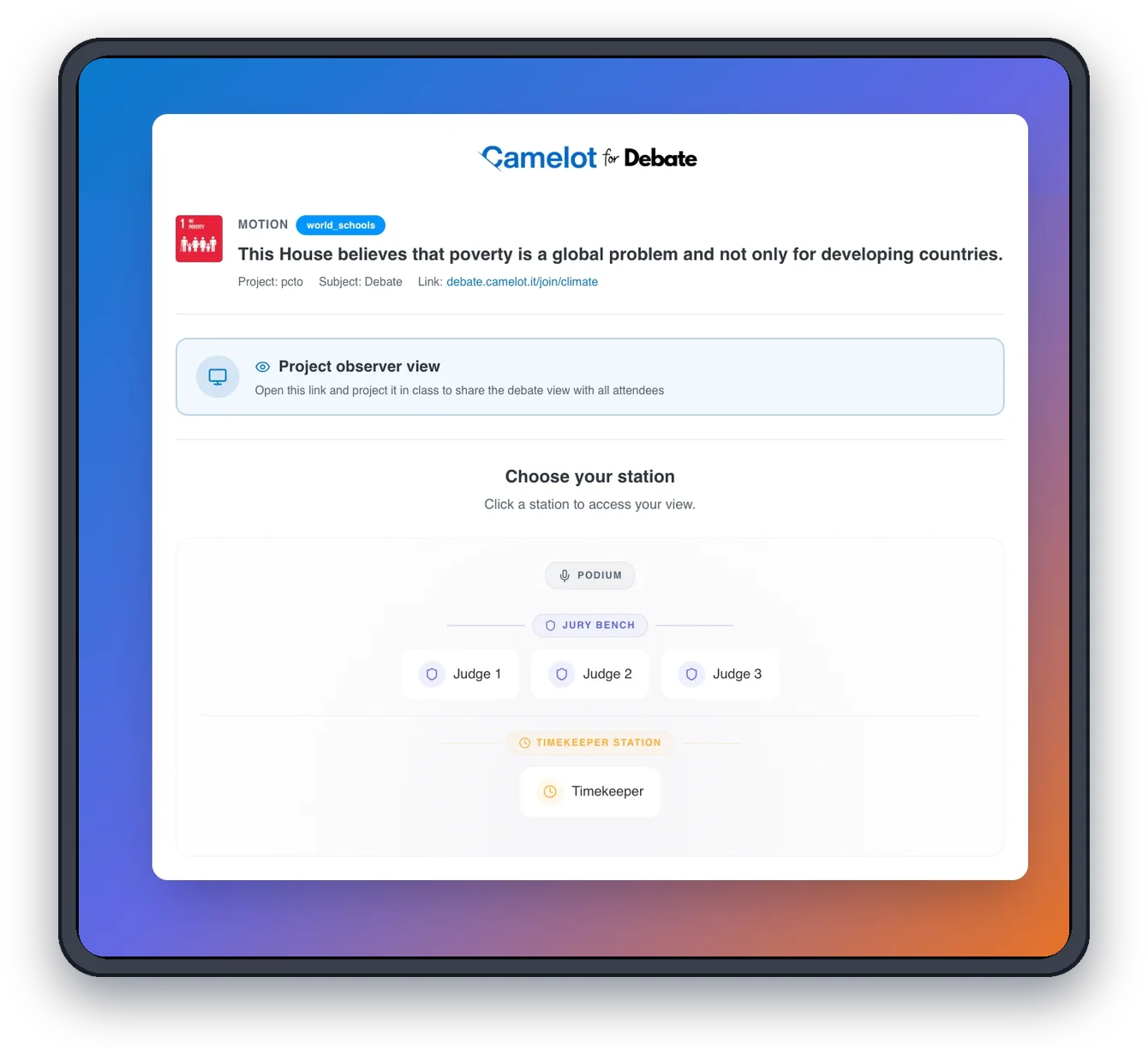
Camelot for Debate on a tablet, the screen where a student picks a seat: podium, judges' bench with three judges and the timekeeper's seat, with the room link
03

Run the debate

The platform follows the order of speeches, the timing, points of information and protected time. The observer view can be projected to the class.
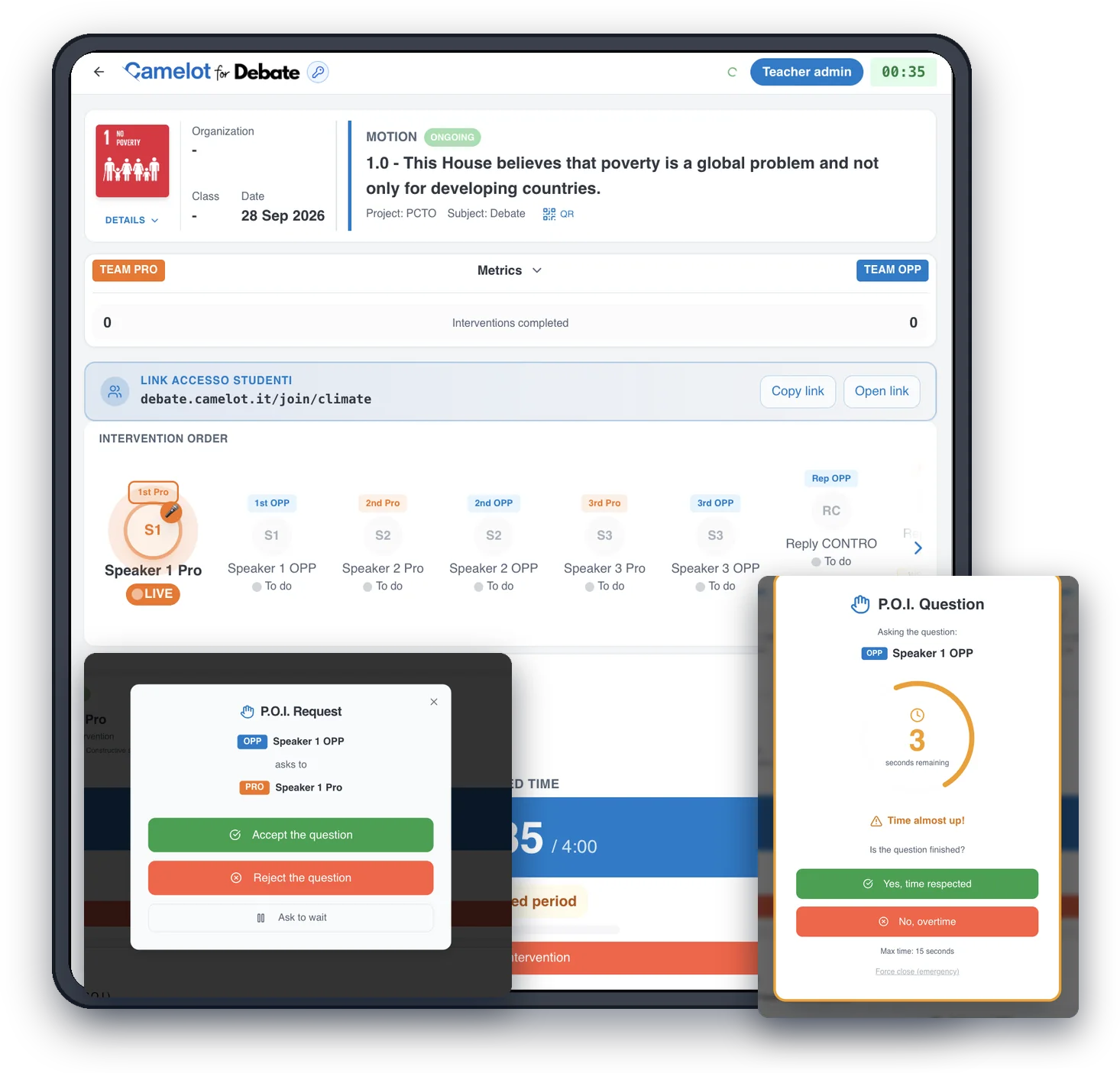
Camelot for Debate on a tablet during the debate: order of speeches, current speaker with the timer and protected time, and the windows to accept a point of information and time it
04

Judges score

Each judge has their own sheet with the format's criteria; scores are added up automatically and the winning team is declared.
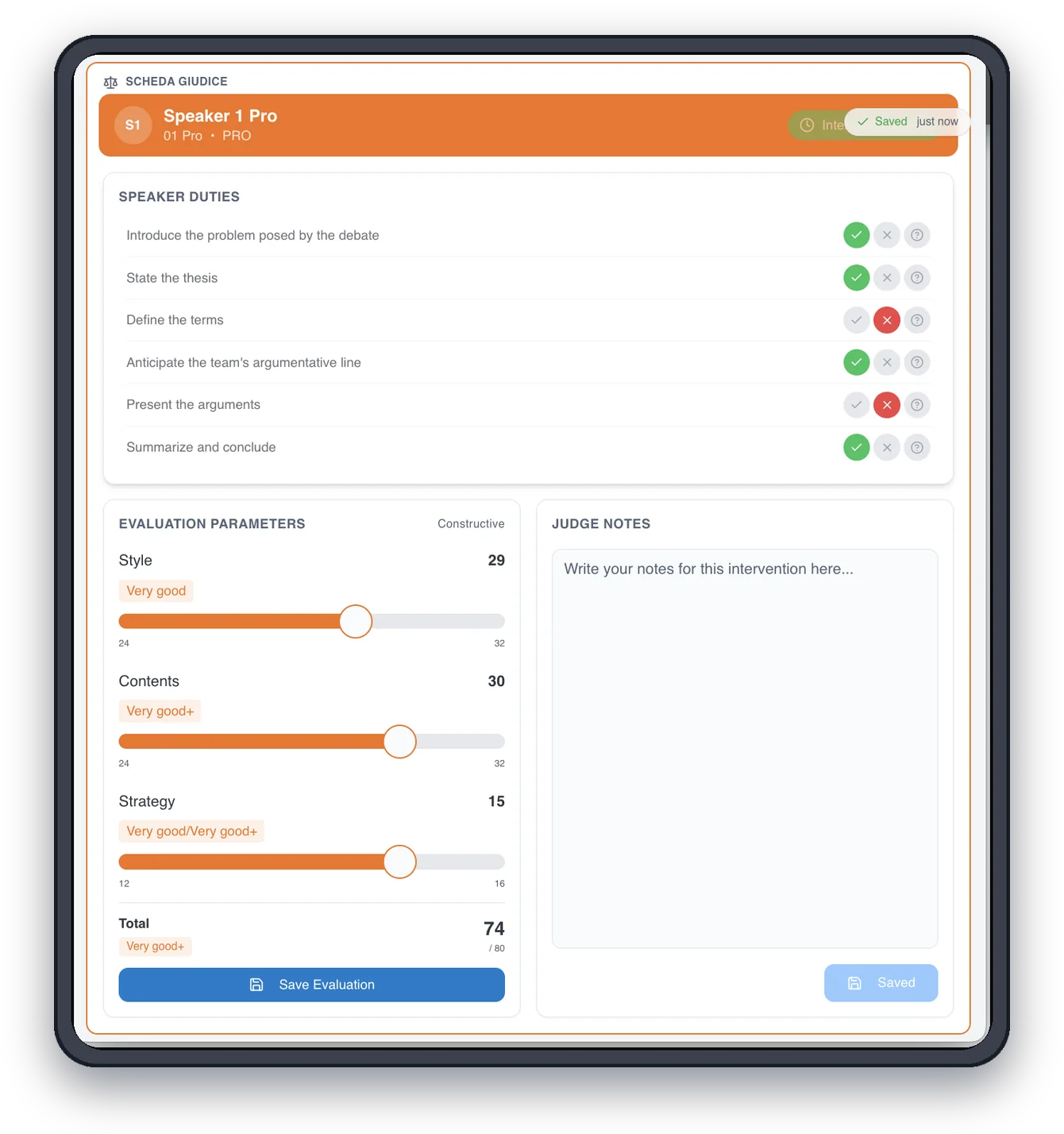
Camelot for Debate on a tablet, the judge sheet: speaker duties with green and red checks, scores for style, content and strategy, notes, and the final verdict with the three judges' votes
05

Report and analysis

When the debate ends, the PDF report documents the activity; upload the audio to get the AI analysis.
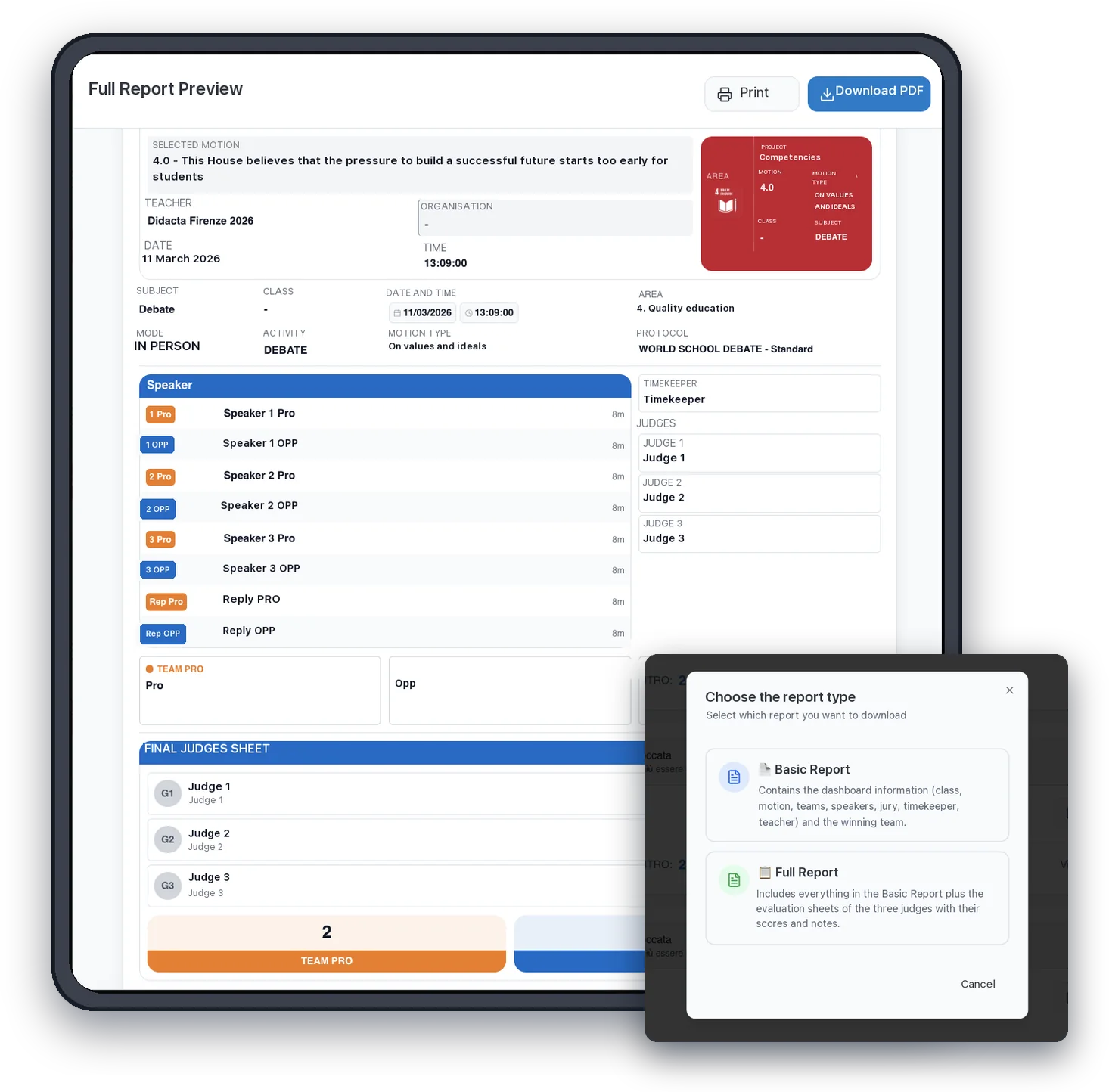
Camelot for Debate on a tablet, the preview of the full report with motion, teacher, format, order of speeches and the judges' final sheet, and the window to choose between basic and full report
Student privacy

Students take part without accounts or email

The teacher is the only user with an account. Students join with the room link and the keyword, pick their role and appear only as Speaker 1 PRO or Judge 1. Who is behind each role is known only to the teacher, outside the platform.

One keyword, no credentialsNo name, surname or email. No passwords to remember and no reset requests for the school.
Audio only enters if the teacher uploads itWith explicit consent. Processed on European infrastructure, not kept, never used to train models.
The school is the controller, Camelot the processorUnder article 28 of the GDPR. Privacy by design and data minimisation, with students who are often minors.

L'full privacy notice (PDF) and the privacy contact, privacy@camelot.vote.
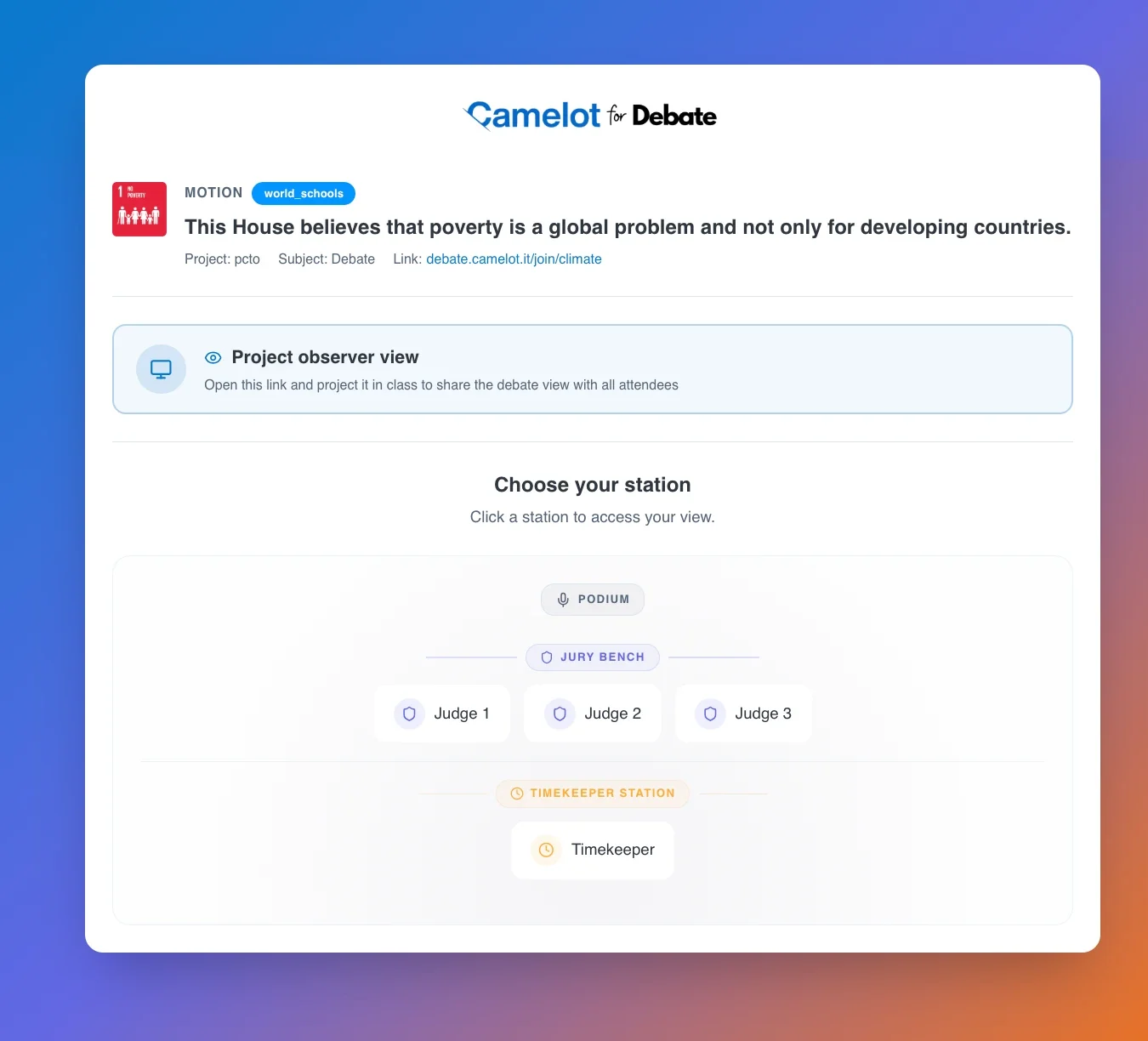
The screen where a student enters the Debate Room from the room link and picks a seat, judge or timekeeper, with no name and no account
Artificial intelligence

Debate analysis with artificial intelligence

From the audio of the debate, the platform reconstructs the arguments of the two teams, the rebuttals and the cognitive biases that emerged. The teacher gets a reading of the debate to bring back to class, without listening to everything again.
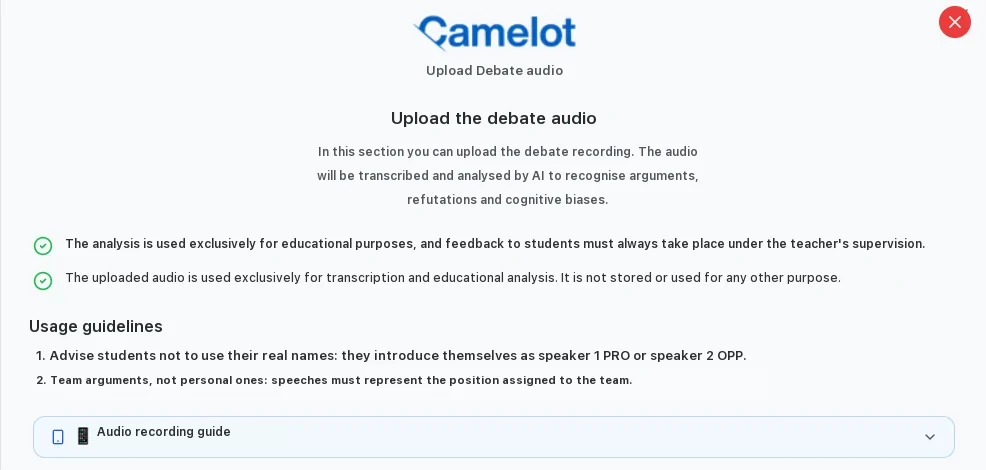
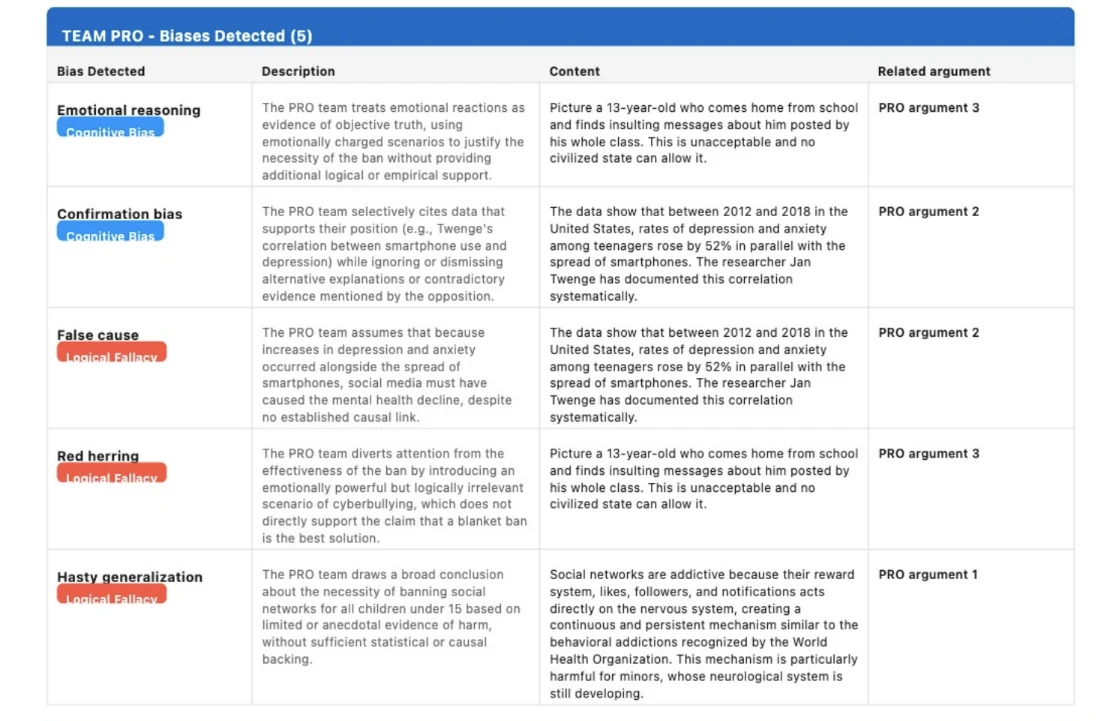
What it doesIt transcribes the audio and returns, for each team, the arguments made, the rebuttals made or missed against the opposing arguments, and the cognitive biases detected, with a description of the bias and the passage it refers to.
What it does not doIt gives no marks and does not assess individual students. The analysis is descriptive and serves a metacognitive purpose: assessment stays with the judges and the teacher, and no decision about a person is made automatically, as required by article 22 of the GDPR.
Italian and EnglishDebates can be analysed in both languages.
Where the data goesProcessing takes place on European infrastructure. The audio is not kept and is not used to train models. Every analysis starts only with the teacher's explicit consent.
Uploading the debate audio in Camelot for Debate: the audio is transcribed and analysed by AI to identify arguments, rebuttals and cognitive biases, with notices on educational use and non-retentionPage of the analysis report with the cognitive biases detected for the PRO team: name of the bias, description, debate content and reference argument
Formats and motions

Formats and motions ready to use

The World Schools Debate format

Available in the standard version and in the short version. In the standard version, constructive speeches last 8 minutes and replies 4; in the short version 4 and 2 minutes, to fit in a single lesson.

The platform generates the role slots required by the format on its own, shows the order of speeches with each one's timing, and signals the time protected from points of information.
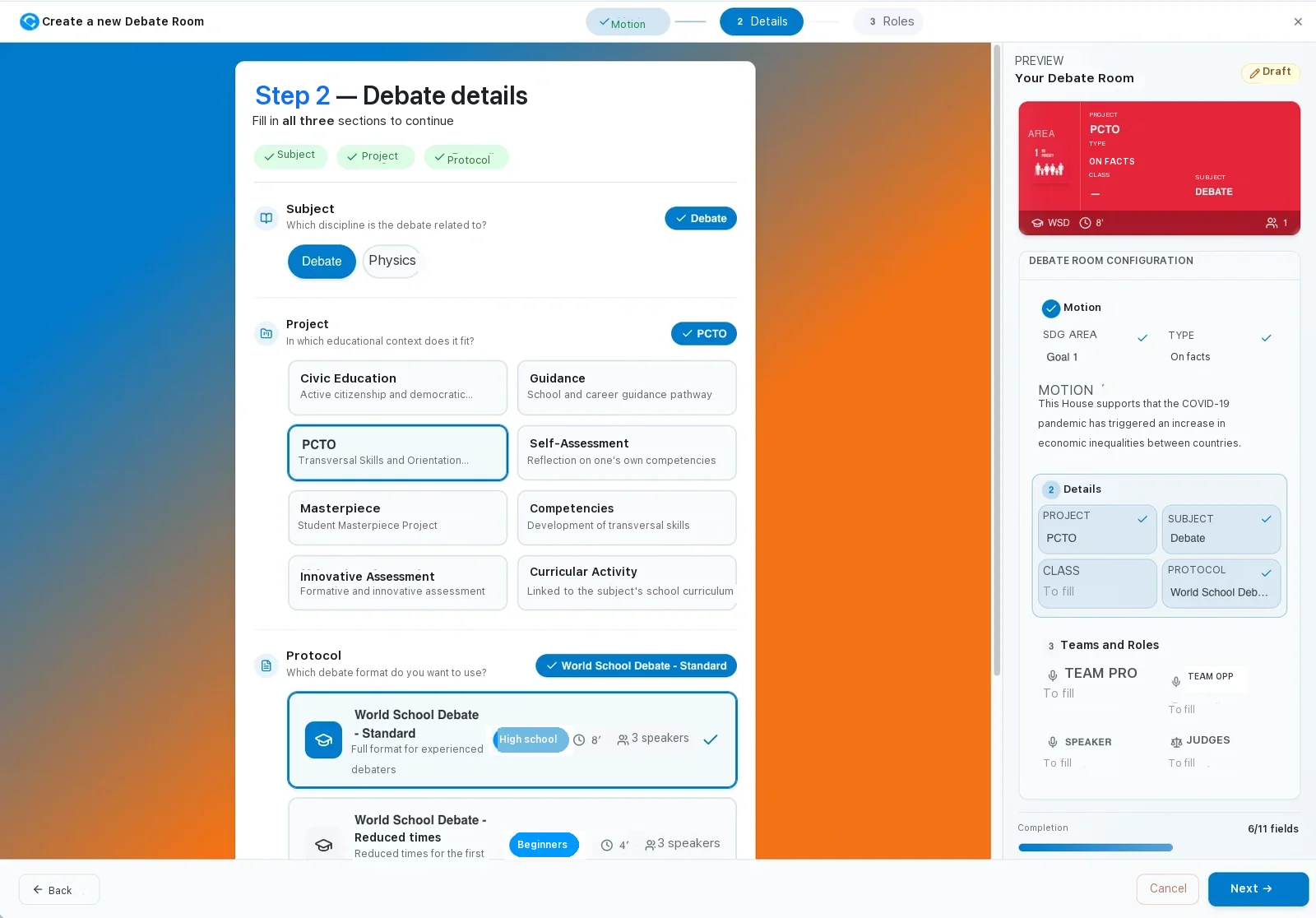
Step 2 of creating a Debate Room: subject, project and choice of format between World Schools Debate standard, 8 minutes and 3 speakers, and short version, 4 minutes

Over 150 validated motions

In Italian and English, organised by Sustainable Development Goal, type (facts, values, action plans), subject and school level. They can be filtered in seconds and are updated in line with ministerial guidelines.

The teacher can also write a custom motion and classify it by level, subject, topic and type, so it appears in the report like the others.
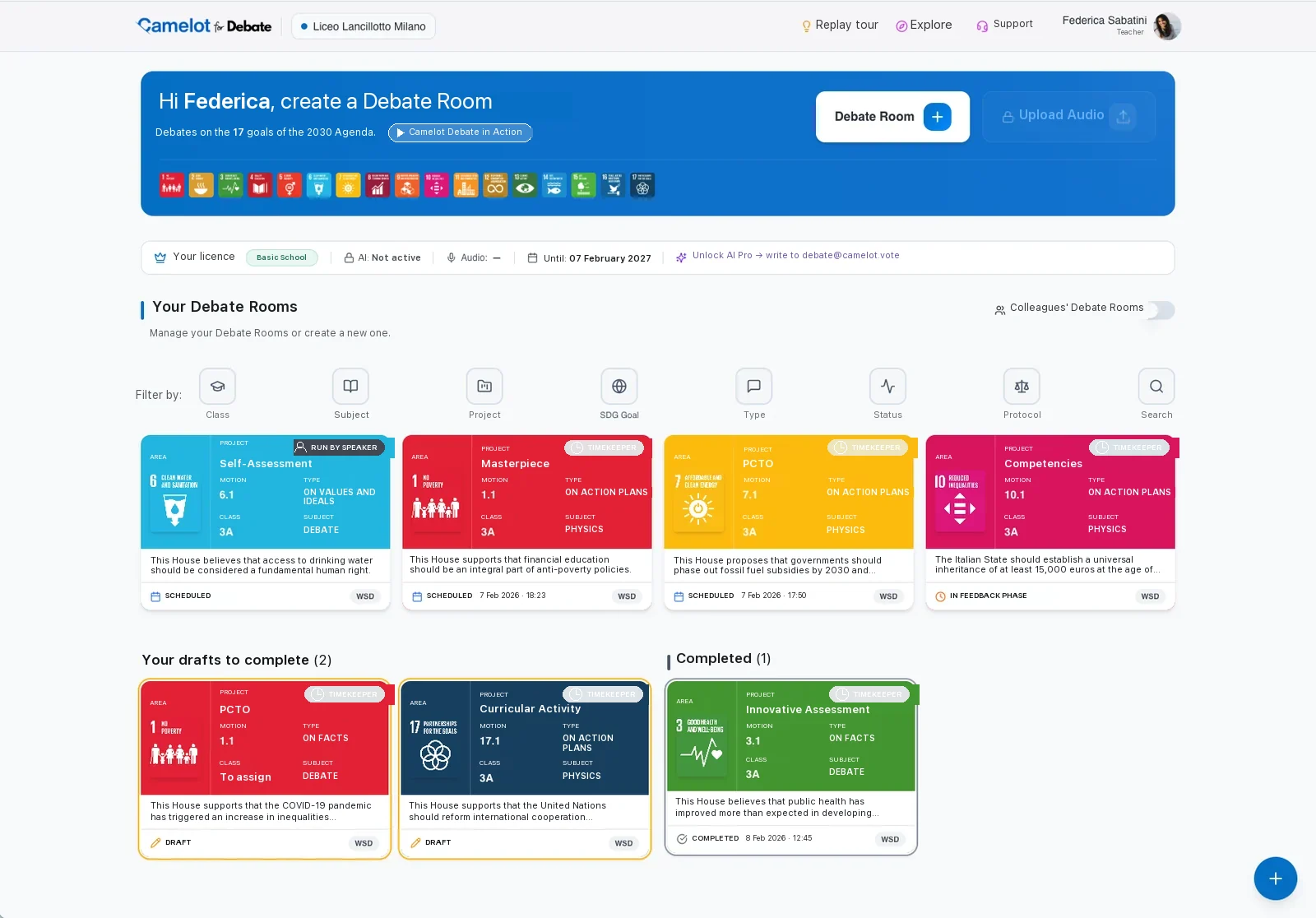
FactsValuesAction plansSustainable Development GoalsBy subjectBy school levelItalianoEnglish
Teacher's homepage in Camelot for Debate: the 17 goals of the 2030 Agenda, filters by class, subject, project, type, status and format, and the Debate Rooms created
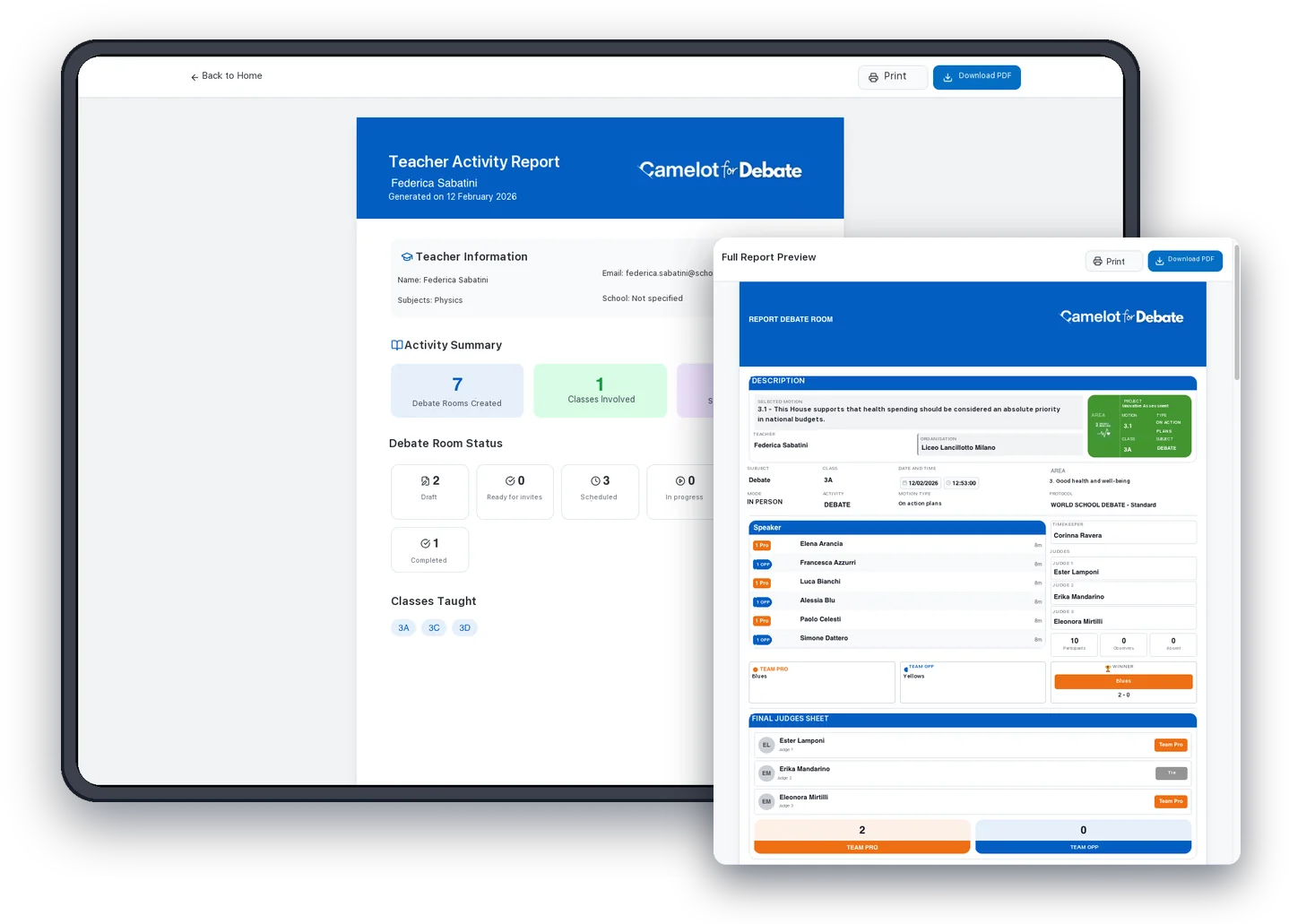
Camelot for Debate on a tablet with the teacher's activity report and, in the foreground, the preview of a Debate Room's full report
Reports and records

Reports to document the activity

When the debate ends, the platform generates a printable PDF. Two levels, chosen from the same page.

Basic reportOne page with motion, teacher, date, format, order of speeches and winning team, to hand to students, families or the school leadership.
Full reportAdds one sheet per judge with each speaker's scores for every criterion of the format. Each judge can also download their own confirmed sheet.
Teacher's reportA summary of the activities carried out, useful for reporting on civic education, guidance and work-related learning projects.
Licences

Free trial and licences for schools

You start with the Trial, free and with no commitment. Then three annual packages, depending on how many teachers will use the platform: you request them from the form at the bottom of the page. Prices including VAT, updated on 27 September 2026.
Free trial40 daysAll the platform's features, to try it with one class.Up to 3 Debate Rooms2 AI audio analysesNo credit cardFree trial
Single TeacherFor one teacher150 €per year, VAT included1 teacherRequest the licence
Most popularClub DebateFor working groups and debate clubs610 €per year, VAT includedUp to 8 teachersRequest the licence
Whole SchoolFor the entire school2,391.20 €per year, VAT includedUnlimited teachersRequest the licence
What every package includes
Unlimited Debate RoomsAI analysis up to 50 audio uploads per year per teacherDebates in Italian and EnglishStudent access via keywordValidated and custom motionsBasic and full PDF reportsInternational formatsVideo tutorials and FAQAccess to new features as they are released
The licence lasts one year from each teacher's activation, with the school's institutional email. For custom projects or several schools, debate@camelot.vote.
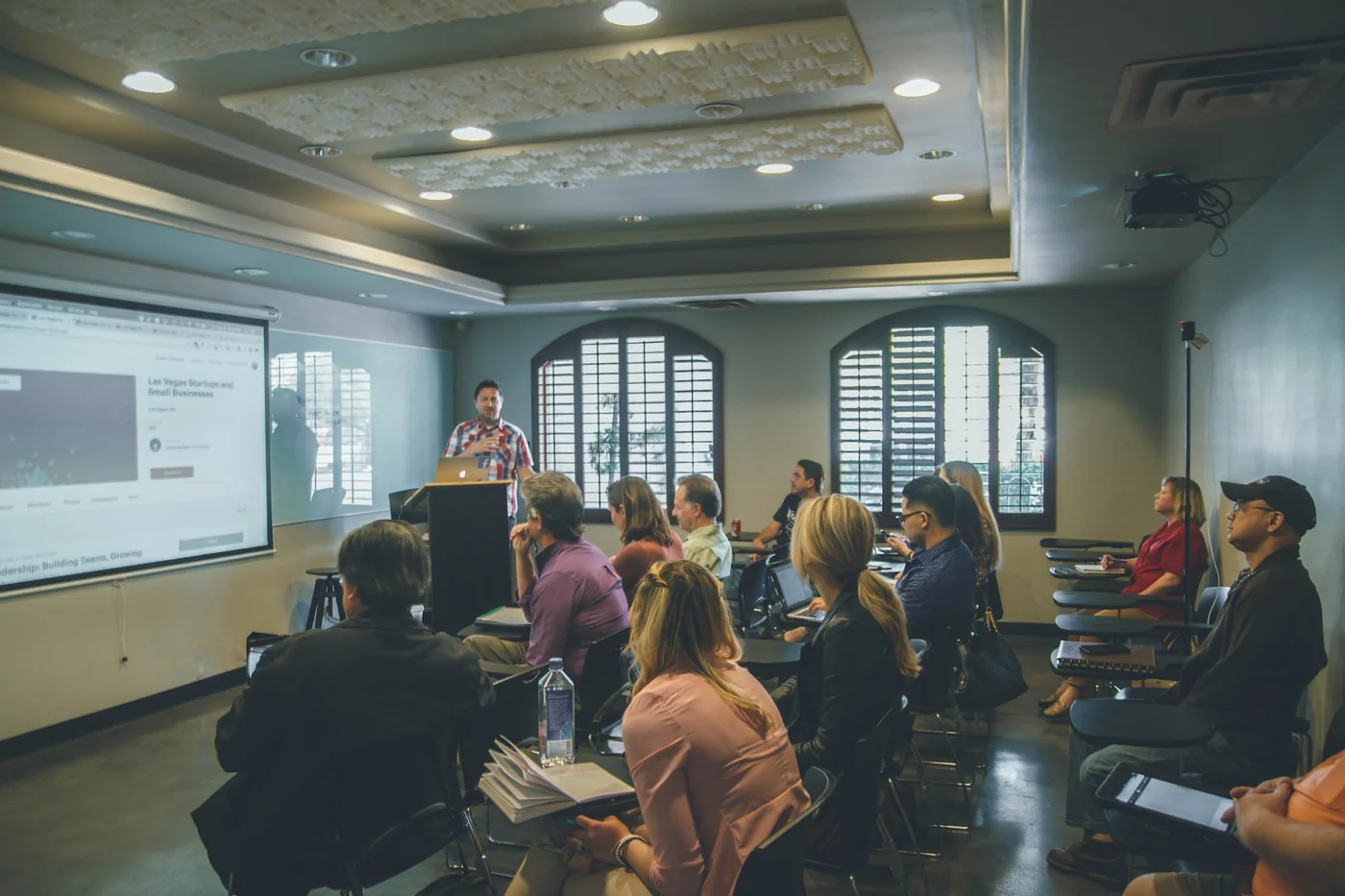
A class during a lesson: the teacher at the board and the students following from their desks
Who it is for

Who Camelot for Debate is for

TeachersWho want to bring debate into the classroom without managing timing, roles and scores by hand. The room is ready in minutes and the report comes on its own.
Debate clubs and projectsThat organise training sessions, groups across classes and school tournaments. Every teacher in the club has their own rooms and reports.
School leadersWho want to structure and document civic education, guidance and work-related learning pathways, with a report for every debate and one licence for the whole school.
Civic Debates

Civic Debates, the debate that enters the City Council

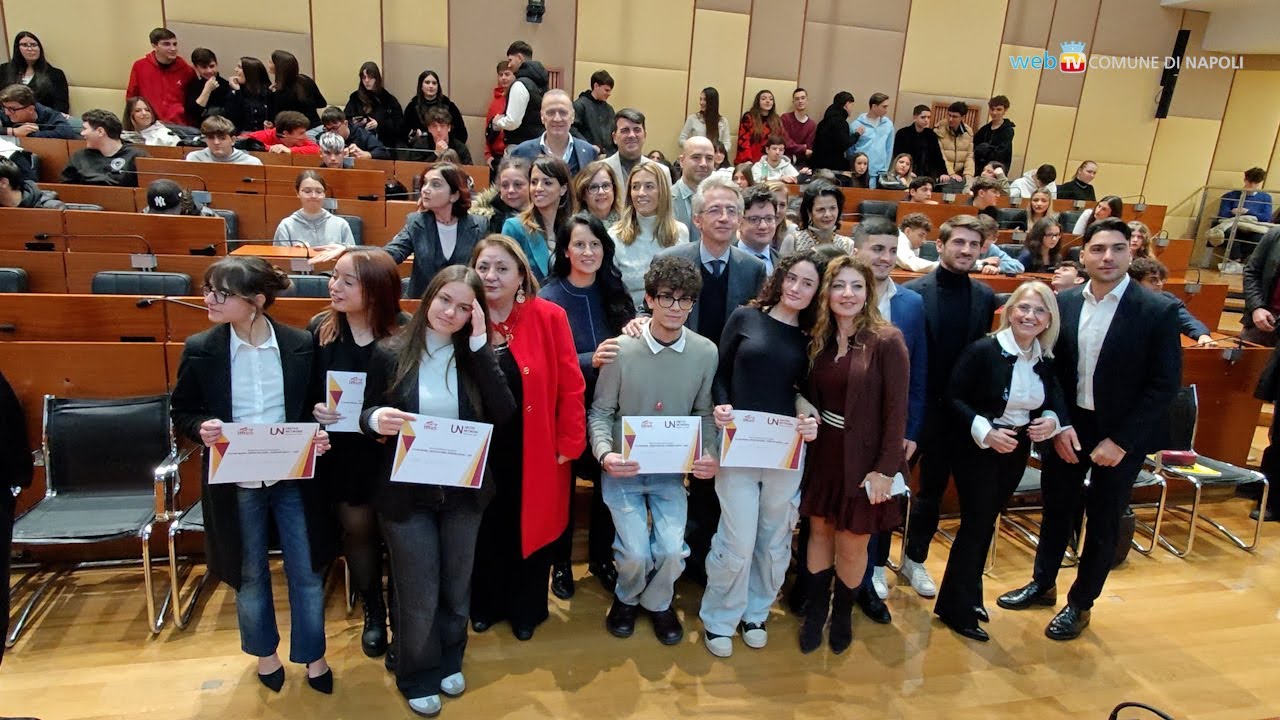
Civic Debates are a programme promoted by a municipality with Camelot: secondary school students train in debate with professional coaches and hold public debates in front of citizens and institutions, on motions linked to the city's policies.

Every debate is analysed with the artificial intelligence of Camelot for Debate. In Turin, a digital vote and a Manifesto handed to the City are added.
How an edition worksOnline trainingArgumentation, rebuttal, public speaking and sources for students; classroom debate and assessment rubrics for teachers.Coaching in classSessions with professional coaches: motions, data, simulations, managing time and voice.Live Civic DebatesFive public debates in an institutional venue, one per 2030 Agenda goal, with the platform's AI analysis.Giving back to the cityAwards for the students, Open Badges and, where planned, a digital vote and a Manifesto handed to the municipality.
The Turin edition also has a page on the website of the City of Turin, Youth Policies. The full story of the Naples edition is in the article The Civic Debates of Naples: school, AI and participation (in Italian). To bring Civic Debates to your city, debate@camelot.vote.
Partners and events

Who we work with and where we have been

Camelot for Debate works with Società Nazionale Debate Italia and takes part in Didacta with the WeDebate network, helping to spread debate in Italian schools.


Events we have taken part in
Didacta ItaliaFirenze · 2026
Didacta ItaliaFirenze · 2025
WMF, We Make FutureBologna · 2025
Festival della LeadershipMilano · 2025
Next Generation AIItalian Ministry of Education and Merit · 2025
Didacta ItaliaRiva del Garda · 2025
MEET SchoolVarese · 2025
Didacta Italia, Puglia editionBari · 2024AI FestivalMilano · 2024Rome Future WeekRoma · 2024Didacta Italia, Sicilian editionCatania · 2023Innovation Village AwardNapoli · 2023
National School Day2023
General States of the Digital SchoolBergamo · 2023
The words of debate

Eight words to understand debate

MotionThe statement being debated, phrased as a claim to support or reject. Example: this House believes that poverty is a global problem.
PRO team and CON teamThe two teams of the debate. The PRO team supports the motion, the CON team opposes it. The side is assigned, not chosen.
SpeakerThe student who delivers a speech for their team. Each speaker has a place in the order of speeches and specific duties to fulfil.
JudgeWhoever scores the speeches according to the format's criteria, fills in the judge sheet and names the winning team.
TimekeeperWhoever times the speeches, signals protected time and records points of information and overtime.
ObserverWhoever follows the debate without taking part. They see the order of speeches, the timing and, if the teacher shares them, the scores and the analysis.
RebuttalThe answer to an argument from the other team, showing its limits with evidence and reasoning. In a debate, an argument left unanswered stands.
Point of information (P.O.I.)A short question that an opposing speaker may ask to put during a speech, outside protected time. The speaker can accept it, decline it or defer it.
Frequently asked questions

Frequently asked questions about Camelot for Debate

Contact us

Request what you need

One form for five requests: the white paper on debate, a demo of the platform, a phone call, a licence for the school, or a research or project proposal. We reply the same day on working days.
Want to try it right away?The Trial does not go through this formFor the 40-day free trial, fill in the form in the app: you receive an email with the link to set your password and you are ready to go.Request the Trial in the app →
What do you need? Select what interests you *
We reply within one working day, Monday to Friday.
Start here

Bring debate into your classroom

The Trial lasts 40 days and includes every feature: a Debate Room takes a few minutes to set up and the first debate can happen in your next lesson.

Try it free for 40 daysFor schools and custom projects: debate@camelot.vote